 martinberger.swiss
Stop Patching Oracle Enterprise Manager Manually
Since Oracle has introduced CSPU Critical Security Patch Update, the Enterprise Manager 24ai got two new Release Updates and Holistic Patches in the last two months. The cadence of for new releases is higher and higher. The patching sequence is always the same: update OMSPatcher if required, update OPatch if required, run Release Update in three phases, apply the Holistic SPB Patch. Each step requires interactive password prompts, commands that run for up to 90 minutes, and version checks before you move on.
Miss a step, mistype a password at the interactive prompt, or lose the SSH session during the 90-minute deploy phase - and you have a broken OMS.
I got tired of doing this manually. I wrote Ansible playbooks that automate the entire sequence. Pre-flight checks, OMS backup, all four patching steps, all interactive prompts handled automatically. No Python module installation required on the control node. No passwords stored in files. All you need is Ansible.
The repository: https://codeberg.org/martinberger_ch/em24ai-security-ansible
Documents
- Oracle Critical Security Patch Update Advisory - July 2026: https://www.oracle.com/security-alerts/cpujul2026.html
- My Oracle Support CPU321 - Critical Security Patch Update (CSPU) Program July 2026 Patch Availability Document (EM-only) - Section 3
- Release Update 11 brings us four improvements: https://docs.oracle.com/en/enterprise-manager/cloud-control/enterprise-manager-cloud-control/24.1/emcon/new-features-release.html#GUID-1A292D6A-212E-4D0B-AC1B-60E39527DD2E
What the Playbooks Cover
The full CSPU patching sequence for Oracle EM 24ai, in order:
| Playbook | What it does |
|---|---|
precheck.yml | Disk space, patch ZIPs staged, tool versions, OMS status, DB connectivity |
00_backup_oms.yml | emctl exportconfig oms before any changes |
01_update_omspatcher.yml | Replace OMSPatcher binary, assert minimum version |
02_update_opatch.yml | Silent JAR install of OPatch, assert minimum version |
03_release_update.yml | Three-phase: analyze / deploy / update via omspatcher |
04_holistic_patch.yml | Apply SPB via omspatcher apply -spb_patch |
site.yml | Master playbook - runs all of the above in sequence |
My Lab Setup
- Oracle Enterprise Manager 24ai Release Update 11 Standalone, OCI Marketplace
- Oracle Linux Server Release 9.x
- Running on Compute Instance in Oracle Cloud Infrastructure OCI
- Software stage directory:
/u01/app/oracle/stage/patch - Backup directory:
/u01/app/oracle/admin/oms/backup - Properties file for OMSPatcher:
/u01/app/oracle/admin/oms/etc/oms.properties - Ansible running in Fedora 44 Windows Subsystem for Linux
Step 0 - Configure
Clone the repository on your control node (the machine running Ansible):
$ git clone https://codeberg.org/martinberger/em24ai-security-ansible.git
$ cd em24ai-security-ansible
Edit vars/config.yml - set your host, SSH key, Oracle paths, and the patch numbers and ZIP filenames for the current CSPU related files:
# OMS Host
oms_host: "your-oms-host.example.com"        # FQDN or IP of the OMS server
oms_ssh_user: "oracle"                         # OS user for SSH (must own ORACLE_HOME)
ssh_key_dir: "~/.ssh"
ssh_key_file: "id_ed25519"                    # private key filename inside ssh_key_dir

# Oracle Paths
oracle_home: "/u01/app/oracle/em/middleware_241/oms_home"
stage_dir: "/u01/app/oracle/stage/patch"
backup_dir: "/u01/app/oracle/admin/oms/backup"
properties_file: "/u01/app/oracle/admin/oms/etc/oms.properties"
# Use "{{ oracle_home }}/oraInst.loc" when the EM home uses a private inventory;
# use "/etc/oraInst.loc" when the DB and EM home share the system inventory.
omspatcher_inv_ptr_loc: "{{ oracle_home }}/oraInst.loc"
oms_admin_user: "sysman"

# WebLogic Admin Server (used by omspatcher apply -spb_patch)
wls_admin_url: "t3s://your-oms-host.example.com:7101"
wls_admin_user: "weblogic"
# password via env var OMS_WLS_PASSWORD

# Repository Database
repo_db_host: "your-db-host.example.com"
repo_db_port: 1521
repo_db_service: "emrep"                      # DB service name (not SID)
repo_db_user: "sysman"
repo_db_admin_user: "sys"                     # SYS or admin user prompted by omspatcher
# password via env var OMS_DB_ADMIN_PASSWORD

# Patch Numbers - update each CSPU
patch_omspatcher: "19999993"
patch_release_update: "39466468"
patch_holistic: "39730260"

# ZIP Filenames - must match what you downloaded from MOS
omspatcher_zip: "p19999993_241000_Generic.zip"
opatch_zip: "p28186730_1394224_Generic.zip"   # MOS patch 6880880 - filename varies per CSPU
opatch_installer_dir: "6880880"               # directory name extracted from the OPatch ZIP
release_update_zip: "p39466468_241000_Generic.zip"
release_update_patch_dir: "39466468"          # directory name extracted from release_update_zip
holistic_zip: "p39730260_241000_Generic.zip"
holistic_patch_dir: "39730260"                # directory name extracted from holistic_zip

# Required Minimum Versions (pre-flight checks)
omspatcher_min_version: "13.9.24.15.0"
opatch_min_version: "13.9.4.2.24"

# Disk Space Pre-checks (minimum free GB per filesystem)
precheck_min_free_gb_oracle_home: 10          # filesystem hosting $ORACLE_HOME
precheck_min_free_gb_stage: 15                # filesystem hosting stage_dir
precheck_min_free_gb_backup: 3                # filesystem hosting backup_dir
precheck_min_free_gb_tmp: 3                   # /tmp
Set the host alias in inventory.yml to match your OMS FQDN - Ansible uses it in all task output:
all:
  children:
    oms:
      hosts:
        172.16.2.77:
          ansible_host: "{{ oms_host }}"
          ansible_user: "{{ oms_ssh_user }}"
          ansible_ssh_private_key_file: "{{ ssh_key_dir }}/{{ ssh_key_file }}"
For local overrides (real hostnames, IPs) copy
vars/config.ymltovars/config.local.ymland pass both with-e @vars/config.yml -e @vars/config.local.yml. The.gitignorekeepsconfig.local.ymlout of git automatically.
SSH Connect
Verify SSH connect from workstation running the playbooks to the target server as OS user oracle. This must run passwordless. If not already confîgured, scroll down to see how to do.
Properties File
Some patching actions require access to Weblogic admin server by key, to achieve, an Oracle Enterprise Manager properties file is created. How to create a properties file? See the README of the Release Update in section 10 Appendix or below in OCI Markeplace image notes.
Step 1 - Export Secrets
All passwords are consumed from environment variables. Nothing goes into files:
$ export OMS_EMCTL_PASSWORD="..."        # SYSMAN password (emctl exportconfig)
$ export OMS_REPO_DB_PASSWORD="..."      # OMS_SYSMAN_PWD (OMSPatcher)
$ export OMS_DB_ADMIN_PASSWORD="..."     # SYS password (deploy / update prompts)
$ export OMS_WLS_PASSWORD="..."          # WebLogic admin password (holistic patch)
Step 2 - Stage the Patch ZIPs
Download all four patch ZIPs from My Oracle Support and copy them to stage_dir on the OMS server before running any playbook.
| Patch | MOS Patch Number |
|---|---|
| OMSPatcher | 19999993 |
| OPatch | 8186730 |
| Release Update 11 | 39466468 |
| Holistic Patch | 39730260 |
Step 3 - Run Pre-flight Checks
Always run this first. It checks everything before a single patch file is touched:
$ ansible-playbook -i inventory.yml -e @vars/config.yml playbooks/precheck.yml
What it verifies:
- Free disk space on
$ORACLE_HOME,stage_dir,backup_dir,/tmp- configurable thresholds, directories existing - All four patch ZIPs present in
stage_dir - Oracle inventory pointer file (
oraInst.loc) exists expectbinary installed on the OMS server- OMSPatcher and OPatch binaries accessible, versions reported
- OMS running via
emctl status oms - Repository DB reachable via
tnsping
If anything fails the assertion, the playbook stops with a clear error message before any change is made.
Step 4 - Backup OMS
$ ansible-playbook -i inventory.yml -e @vars/config.yml playbooks/00_backup_oms.yml
Runs emctl exportconfig oms and writes the backup to backup_dir. No downtime required.
Step 5 - Update OMSPatcher
Verify current version
The playbook checks the current version and reports it before making any change. Check the CSPU Patch Availability Document for the required minimum - only update if below it.
$ ansible-playbook -i inventory.yml -e @vars/config.yml playbooks/01_update_omspatcher.yml
What the playbook does
- Records the current OMSPatcher version
- Renames
$ORACLE_HOME/OMSPatchertoOMSPatcher.bak_YYYYMMDD - Extracts the new ZIP into
$ORACLE_HOME - Asserts the new version meets
omspatcher_min_versionfromvars/config.yml
The old
OMSPatcher.bak_YYYYMMDDdirectory can be removed after the full patching sequence completes successfully.
Step 6 - Update OPatch
$ ansible-playbook -i inventory.yml -e @vars/config.yml playbooks/02_update_opatch.yml
OPatch ships as a JAR installer. The playbook extracts the ZIP, runs the silent install using Oracle’s bundled JDK (no separate Java installation needed), and asserts the minimum version. In my case running the previous RU, OPatch was already at the required version - the assertion simply confirmed it.
Step 7 - Release Update (three phases)
The Release Update is the most complex step. Run each phase individually by tags and review the output before proceeding. Or don’t use tags and all steps are done in order.
Phase 1 - Analyze
$ ansible-playbook -i inventory.yml -e @vars/config.yml playbooks/03_release_update.yml --tags analyze
The
-analyzeflag verifies the patch against the installed version and checks for compatibility issues. No changes are made. Wait forOMSPatcher succeededin the output before moving on.
Phase 2 - Deploy
$ ansible-playbook -i inventory.yml -e @vars/config.yml playbooks/03_release_update.yml --tags deploy
This is the pre-downtime phase. OMSPatcher creates the clone home (
cloneExtOMSHomeandcloneOMSHome), generates the SQL edition, and registers artifacts. Expect 60–90 minutes. The task runs async - no SSH timeout risk.
Phase 3 - Update
$ ansible-playbook -i inventory.yml -e @vars/config.yml playbooks/03_release_update.yml --tags update
This is the downtime phase. OMSPatcher stops the OMS, applies the patch, switches the SQL edition, and brings OMS back up. No manual
emctl stop/startneeded. Wait forOMSPatcher succeeded.
How interactive prompts are handled
All three phases prompt for a SYS username, SYS password, and “Do you want to proceed?” confirmation. The playbook uses ansible.builtin.expect to respond automatically:
responses:
  'Enter SYS or Non-SYS \(Admin User\) username:': "{{ repo_db_admin_user }}"
  'Enter .* password\s*:': "{{ lookup('env', 'OMS_DB_ADMIN_PASSWORD') }}"
  'Do you want to proceed\?.*': 'y'
The password comes from the environment variable. no_log: true keeps it out of Ansible output. If pexpect is not installed on the OMS server, the playbook installs it via pip --user before proceeding - no root access required.
Verification
After the update phase, check the EM version via SYSMAN → About Enterprise Manager:
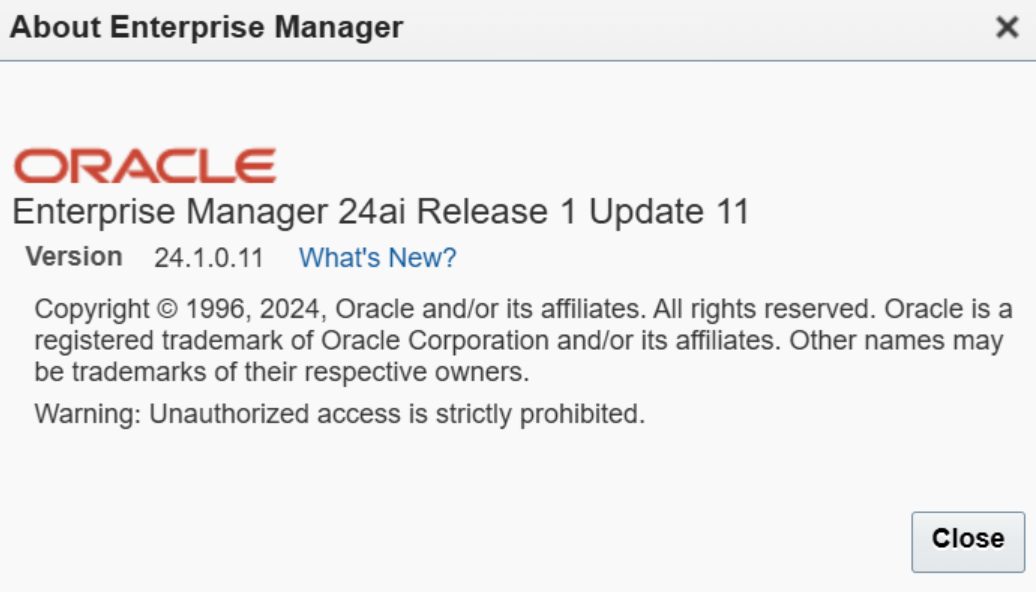
Or via OMSPatcher:
$ $ORACLE_HOME/OMSPatcher/omspatcher lspatches | grep "Platform Update"
Step 8 - Holistic Patch
$ ansible-playbook -i inventory.yml -e @vars/config.yml playbooks/04_holistic_patch.yml
Applies the Security Bundle Patch via omspatcher apply -spb_patch. This step updates underlying components (JDK, Perl, and others) and creates a short OMS downtime - handled internally by OMSPatcher.
The holistic patch prompts for a WebLogic admin URL, username, and password. All answered automatically:
responses:
  'Please enter OMS weblogic admin server URL.*:>': "{{ wls_admin_url }}"
  'Please enter OMS weblogic admin server username.*:>': "{{ wls_admin_user }}"
  'Please enter OMS weblogic admin server password:>': "{{ lookup('env', 'OMS_WLS_PASSWORD') }}"
After completion the playbook runs emctl status oms to confirm the service came back up.
Verification
$ $ORACLE_HOME/OMSPatcher/omspatcher lspatches | grep 39730260
Updating for a New CSPU Quarter
Only vars/config.yml changes each quarter. Update the patch numbers and ZIP filenames from the CSPU Patch Availability Document on My Oracle Support:
patch_release_update: "39466468"
release_update_zip: "p39466468_241000_Generic.zip"
release_update_patch_dir: "39466468"

patch_holistic: "39730260"
holistic_zip: "p39730260_241000_Generic.zip"
holistic_patch_dir: "39730260"
Stage the new ZIPs, run precheck.yml, proceed. Everything else stays the same.
Anything Else?
Yes:
- Patch your EM Agents via Agent Update Plan or Gold Image after each CSPU
- Verify for latest JDK your Agents can run - EM 24.1 AI: How to Use the Latest Certified JDK 8 Update with 24.1 Agents - KB518379
- Track the Oracle CSPU schedule - Oracle now ships a Holistic Patch monthly alongside the quarterly Release Update
- Build it into your change calendar - the effort per quarter is low, the risk of skipping is not
Some notes about the Oracle Enteprise Manager EM24ai OCI Marketplace Image
For testing purposes, you can use the OCI Marketplace Image, this runs well, is easy to deploy and with current date, you get Release Update 10. A good base to verify Release Update 11 and the playbooks. I used the SIMPLE PROVISIONING in Stack with one node only to verify the Ansible playbooks.
Adaptions
On provisioned Oracle Enterprise Manager 24ai Management Server (OMS) in Oracle Cloud Infrastructure:
- Connect as OS user opc first, then switch to oracle via sudo. Add your public key from the Ansible host to the oracle user’s authorized keys to enable passwordless SSH access from the Ansible control plane to the OMS.
$ cd $HOME
$ ssh-keygen
$ cd .ssh
$ vi authorized_keys
>> add your public key here

$ chmod 600 authorized_keys
- As OS user oracle, create the WLS key and config file. Weblogic username and password are required.
$ mkdir -p /u01/app/oracle/admin/oms/wlskeys
$ cd /u01/app/oracle/admin/oms/wlskeys

$ORACLE_HOME/OMSPatcher/wlskeys/createkeys.sh -oh $ORACLE_HOME -location /u01/app/oracle/admin/oms/wlskeys
- As OS user oracle, ensure the OMS properties file is in place. If it does not exist, create a new one. Example:
$ mkdir -p /u01/app/oracle/admin/oms/etc && cd /u01/app/oracle/admin/oms/etc
$ vi oms.properties
Add the OMS URL here. If unclear, run emctl status oms -details to retrieve it.
AdminServerURL=t3s://oms1:7101
AdminConfigFile=/u01/app/oracle/admin/oms/wlskeys/config
AdminKeyFile=/u01/app/oracle/admin/oms/wlskeys/key
$ chmod 600 oms.properties
- As OS user opc, install expect package
$ sudo dnf install -y expect
- As OS user oracle, create admin file structure for OMS
$ mkdir -p /u01/app/oracle/admin/oms/backup
$ mkdir -p /u01/app/oracle/admin/oms/etc
- Pro-tip DNS If the Ansible control plane cannot resolve the OMS hostname, use the IP address directly in inventory.yml and vars/config.yml.
Summary
Oracle Enterprise Manager is THE monitoring platform for your databases. If it is compromised, everything it manages is at risk. Doing the patching manually is error-prone, unrepeatable, and frankly unnecessary.
These Ansible playbooks automate the full sequence: one config file to update whenever Release Updates and Holistic patches are published. Four environment variables for secrets, six playbooks that handle the rest - including all interactive prompts and version assertions. Pre-flight checks catch problems before they matter.
The code is on Codeberg, free to use and adapt: https://codeberg.org/martinberger_ch/em24ai-security-ansible
PATCH YOUR OEM. Often. No excuses!